The social video saver
4.1(c)5.2.3
Approved once, then rejected on an update for using the platform’s brand name and for downloading third-party media.
An earlier approval protects nothing. Every build is reviewed fresh.
Ship a Claude-built iPhone app without getting rejected.
AI agents can build your app in a weekend. App Review still checks it against the same rules. This playbook shows you which rules catch AI-built apps, and how to pass them before you press Submit.
Tick the fixes to resubmit:
Try it: this is a real rejection pattern for AI-built paywalls.
AI-built apps keep tripping the same handful of guidelines. Not because the rules are hard, but because nobody asked the agent to think like a reviewer.
| Guideline | What gets flagged | How AI-built apps trip it |
|---|---|---|
| 2.1 Completeness | Crashes, placeholder text, dead links, no demo account | The agent scaffolds screens with sample data and “Coming soon” copy |
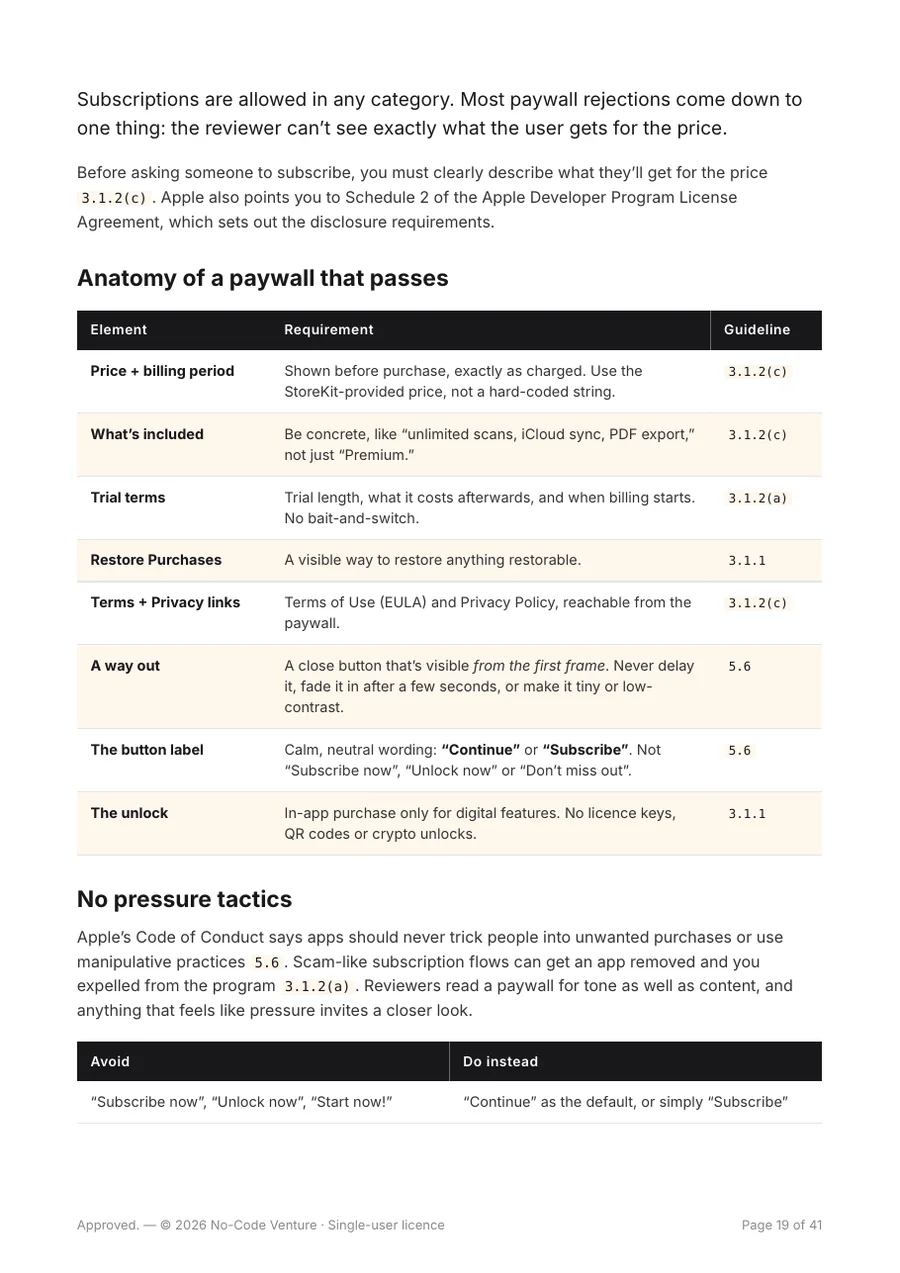
| 3.1.2 Subscriptions | Unclear price, missing restore, pressure tactics | Paywalls generated without terms, trial details or a visible way out |
| 4.1 Copycats | Another brand’s name, icon or UI | “Make it like [popular app]” prompts copy too literally |
| 4.3 Spam | Duplicate apps, saturated categories | One boilerplate, many near-identical apps |
| 5.1.2(i) Data sharing | User data sent to a third-party AI without consent | The AI call is the whole product, and nobody added a consent screen |
| 5.2 Intellectual property | Trademarks, copyrighted assets, media downloading | The idea itself depends on someone else’s content |
Eight chapters that follow an app from first sketch to App Store, then the checklist you’ll run before every submission.
Prototype in Claude Design with Opus 5.5, then rebuild it 1:1 in SwiftUI.
Which agent and model to use, the house rules file, and testing like a reviewer.
The guidelines that catch AI-built apps, including the new third-party AI rule.
Paywall anatomy, pressure tactics to avoid, and StoreKit 2 vs RevenueCat.
Names without trademark traps, screenshots, and review notes that get approved.
When to reply, fix or appeal, with a reply template.
Reusing one codebase across niches without tripping the spam rules.
SwiftUI and concurrency expert skills, three review skills, install commands.
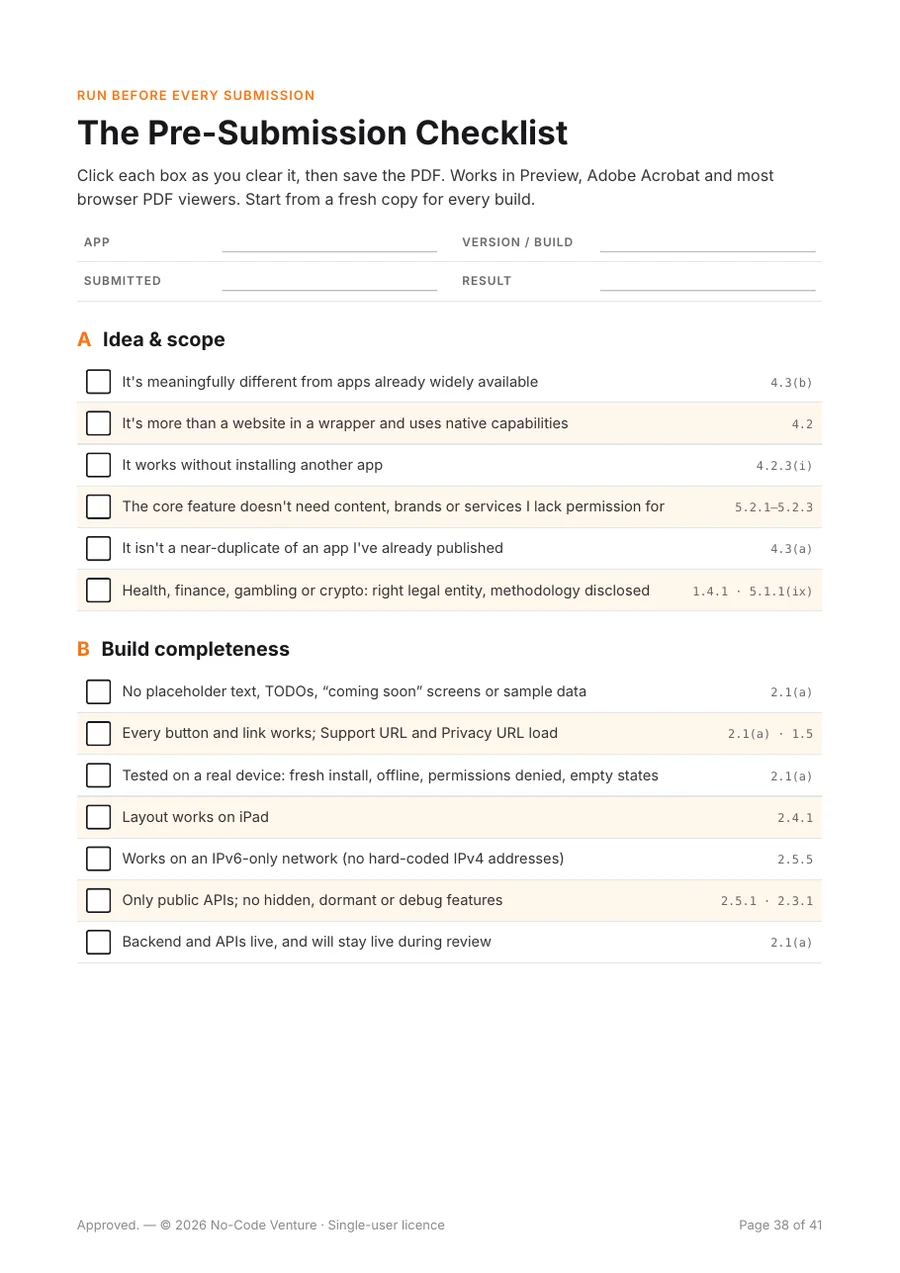
52 checks with guideline numbers. Tick them in Preview, Acrobat or your browser.
Most rejections are decided long before submission. The book moves the review to the start.
Step 1
Build a clickable HTML prototype in Claude Design, including the paywall, consent and account-deletion screens reviewers check.
Step 2
Rebuild it in SwiftUI with Cursor or Claude Code. Use Grok 4.6 for everyday screens, and Sonnet 5.5 or Opus 5.5 when it gets complex.
Step 3
Run the review-proofer and paywall-checker skills. They rank every issue by guideline before you archive.
Step 4
Tick the 52-point checklist, paste in the review-notes template, and send a build the reviewer can approve.
The book includes anonymised case files: what was built, what Apple flagged, and what to do instead.
Approved once, then rejected on an update for using the platform’s brand name and for downloading third-party media.
An earlier approval protects nothing. Every build is reviewed fresh.
A card franchise’s name in the subtitle and official artwork in the app. Caught before Apple did.
Calling an app “unofficial” doesn’t make it licensed.
A build rejected by a reviewer over the paywall button wording, which read as pressure.
Use “Continue” or “Subscribe”, with a close button visible from the start.
Most chapters end in something you can copy straight into Cursor or Claude Code.
The SwiftUI Expert and Swift Concurrency skills are created by Antoine van der Lee (SwiftLee) and released under the MIT licence. The book credits his originals and links his Swift Concurrency Course.

Mido runs No-Code Venture from Hilversum, the Netherlands. He’s a Bubble Silver Agency Partner with 200+ published Bubble plugins used by 9,000+ people, and he publishes iOS apps on the App Store. The lessons in this book come from those submissions.
No. The book assumes an AI agent writes the code. You’ll need a Mac with Xcode to build and run the app, and an Apple Developer Program membership to submit it.
Both. Every rules file, prompt and skill works in either, and the install commands are given for both.
No. Nobody can promise that. App Review makes the call. The book removes the most common, avoidable reasons for rejection so the reviewer has nothing easy to flag.
This is the October 2026 edition, based on Apple’s App Review Guidelines last updated June 8, 2026. Apple changes the rules over time, so the book tells you how to check the current version.
USD $9, once. No subscription. You get the PDF and a personal download link by email.
A 41-page PDF. The 52-point checklist uses real form checkboxes, so you can tick it and save it in Preview, Adobe Acrobat or most browser PDF viewers.
No. It’s an independent guide by No-Code Venture, written from experience shipping apps. It isn’t legal advice.
One avoidable rejection costs you days. The playbook costs you an evening, and you’ll reuse the checklist on every build.
Buy the playbook$9 one-time · secure checkout with Stripe · PDF delivered by email